 PVersion
File names
Which file names the server accepts, why files that break the rule are held back, and how to fix them all at once.
The server accepts only plain letters, digits, spaces, dots, dashes and underscores in file and folder names. Files with Turkish letters (ç, ğ, ı, ö, ş, ü), apostrophes, or letters from other alphabets such as Cyrillic don't go to the server. PVersion finds them before you submit and makes fixing them a one-button job.
Why the rule exists
Game engines, tools and the server don't all write characters outside plain Latin letters the same way on every computer. A file called Kasa_Çelik.uasset on one computer can show up under a different name on another, and the scenes that depend on it break. That's why the rule is applied from the very start.
The rule applies to folders too: if a folder's name breaks it, none of the files inside it go either.
Which files are held back
New files whose names break the rule are never put on the submission list. PVersion tells you in three places:
- A yellow notice at the top of the window, saying how many files aren't going to the server and that your teammates can't get them. Its buttons: Fix names (opens the File names page), See the list (shows the list in My changes) and Later (hides it for this session; it comes back when more files appear or the app starts again).
- The Cannot be submitted group at the top of My changes: each file shows "breaks the name rule — fix it in File names" and a Fix link.
- A question when you submit: "… files are not part of this submit (their names break the rule). The submit will be incomplete. Submit anyway?" Choose Fix the names first (recommended; nothing is submitted) or Submit incomplete (the rest goes).
These files stay on your computer as they are; they just don't go to the server. If you submit incomplete, scenes and assets that use them will look broken for your teammates.
Unreal's personal folder (Content/Developers/<your Windows user name>) is never submitted, so its names aren't checked.
The File names page
When a name breaks the rule, a File names page appears in the left column; the number next to it says how many files or folders are affected.
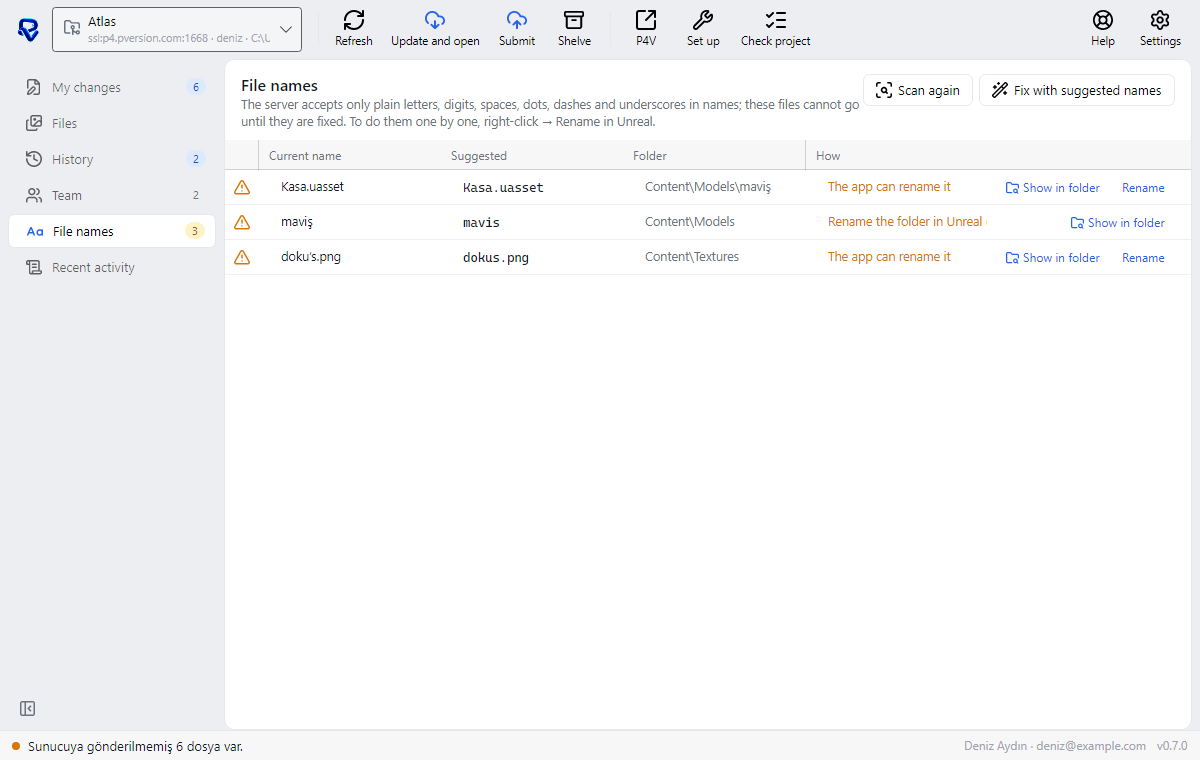
| Column | What it shows |
|---|---|
| Current name | The file's or folder's name today |
| Suggested | The name PVersion suggests: Turkish letters become their plain equivalents (ş→s, ı→i…), apostrophes are dropped, other characters become underscores |
| Folder | Where it is in the project |
| How | How this file gets fixed |
Each row has Show in folder (opens Windows Explorer with the file selected) and, for files the app can rename itself, Rename. Scan again scans the folder from the start.
Fix with suggested names
Fix with suggested names fixes the names on the list in one go.
- Close Unreal or Unity. If it's open, PVersion won't start renaming and tells you to close it.
- On the File names page, click Fix with suggested names.
- The names are fixed, and the changes appear in My changes.
- Send them with Submit to server.
What happens behind the scenes depends on the project:
- Unreal: PVersion runs Unreal in the background and has Unreal itself rename the assets and folders to the suggested names, so the links between assets are fixed too. Redirector files left at the old names are taken off the list and moved to the Recycle Bin.
- Unity: PVersion renames each asset together with its
.metafile. Unity keeps links by the ID in the.metafile, so nothing breaks.
In an Unreal project, use Rename on the row for plain files that aren't assets (a .txt or an image, for example). To fix one asset at a time, right-click it in Unreal's Content Browser and choose Rename. Don't rename Unreal assets in Windows Explorer; links can break.
After fixing
- Fixed files appear in My changes as normal changes, with the new names as new files. Don't forget to submit them.
- If you renamed something by hand in Unreal, a redirector file may be left at the old name; its Note column says "redirector left at the old name; remove it with Discard". Remove it with Discard.
- If entries with old names got stuck on the list, Rebuild the list in My changes gathers the list again from the folder; see Submitting your work.
- When PVersion renames a file itself (with Rename, or in a Unity project) and a file with the suggested name already exists, it leaves that file alone and writes "… already exists; choose a name yourself." to Recent activity. Give it a name by hand.
Ask the assistant on the site or write to [email protected].