 PVersion
File locks
Files that can't be merged are held by one person at a time; see who has what and tell them you're waiting.
If two people change the same map, model or edit project at the same time, there's no way to merge the two: one overwrites the other. PVersion prevents this from the start. These files are held by one person at a time; whoever starts changing the file keeps it until they submit or discard it.
Which files are locked
With PVersion's default setup, these files are locked:
| Kind | Extensions |
|---|---|
| Unreal | .uasset, .umap, .upk, .udk, .ubulk, .uexp, .uptnl |
| 3D and texturing tools | .fbx, .obj, .abc, .usd, .usda, .usdc, .usdz, .blend, .ma, .mb, .max, .c4d, .ztl, .spp, .sbs, .sbsar |
| Images | .png, .jpg, .jpeg, .tga, .bmp, .gif, .psd, .psdt, .psb, .webp, .tif, .tiff, .exr, .hdr, .dds, .svg, .ai, .eps |
| Audio and video | .wav, .mp3, .ogg, .flac, .aif, .aiff, .m4a, .mp4, .mov, .mkv, .avi, .webm, .m4v, .mxf, .r3d, .braw, .ari, .crm, .mts |
| Edit and compositing projects | Premiere Pro (.prproj, .prel), After Effects (.aep, .aet, .aepx, .mogrt), DaVinci Resolve (.drp, .drt) |
| Unity | Scenes and prefabs (.unity, .prefab) |
| Other | .ttf, .otf, .pdf, .docx, .xlsx, .pptx, .zip, .7z, .rar, .unitypackage, .cubemap |
Code and text files aren't locked: several people can change files like .cpp, .h, .cs, .py, .ini, .json, .uproject, .uplugin and .shader at the same time. If two people change the same text file, whoever submits second makes a choice; see The server has a newer version.
Saving a file makes it yours
You don't have to do anything extra to take a locked file:
- While Unreal is connected to PVersion, saving an asset makes Unreal take the file for you; confirm if it asks. More in Unreal Engine.
- PVersion also watches the project folder: a file you save shows up in My changes within a few seconds and is taken for you.
From then on, the file shows under your name for the team. The lock is lifted when you submit the file or click Discard.
The Team page
The Team page shows the files your team members are working on right now. The number next to Team in the left column is how many files other people have open.
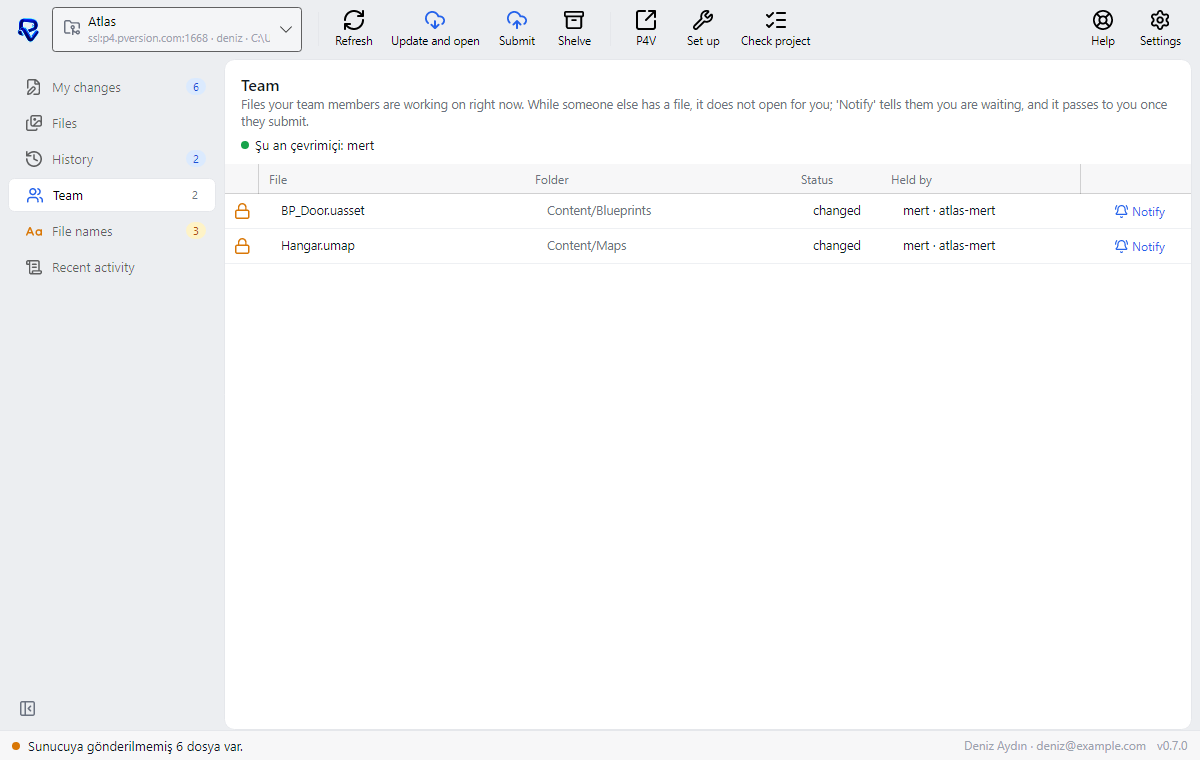
- The File, Folder, Status and Held by columns tell you who has the file and what they're doing with it.
- The top of the page lists the team members who are online right now.
- When nobody has a file open, you'll see "Nobody has files open."
Files held by others also carry a lock icon on the Files page; click one and the panel on the right says who has it.
When someone else has the file
If you change and save a file someone else has anyway, PVersion won't delete your work, but it won't submit it either:
- The row gets a lock icon, and the Note column says, for example, "locked by Mert · your save stays on your computer; it passes to you once they submit".
- Your save stays on your computer. When Mert submits, the file passes to you; but the server then has a newer version than yours, and you'll need to choose which one stays. Nothing is merged; one of the two versions is kept: The server has a newer version.
Notify
If you're waiting for a file, click Notify on its row on the Team page (the panel on the Files page has the same button). The person holding it gets an "I'm waiting for this file" notification in their app: "Deniz is waiting for: Hangar.umap", followed by "You have this file. When you are done, submit it to the server; it then passes to them."
Notifications are turned on and off in Settings → Notifications. When they're off, the message is still written to the Recent activity page.
Nobody takes a lock away from you
PVersion never lifts a lock on its own, and your teammates can't take the file from you. It stays with you until you submit or discard it.
The one exception: if the person holding a file can't be reached for a long time (on leave, left the studio), the studio's owner or an admin can release it in the console, on the project page's Open files tab. The file on that person's computer isn't deleted, and their change stays there. Who can do this: Team and permissions.
Ask the assistant on the site or write to [email protected].