 PVersion
Start using PVersion in Blender
The PVersion add-on brings getting the latest, sending, a file's history and its review status into Blender's sidebar. The add-on is free; it works with the PVersion desktop app and a paid PVersion plan for your studio.
What you need
Setup
-
Choose a plan and open your studio
Pick a plan on our website and create your studio's account; payment is taken by card on a secure checkout page. When you create your first project in the console, your studio's server is set up automatically; this usually takes a few minutes.
-
Install the PVersion app
Download the app and install it on every computer that works on the project. Sign in with the account you opened; your teammates join through the invitation they get by email.
The download starts when you press the button.
-
Connect your project
Add your project in the app: the first person sends the folder to your studio's server, everyone else gets it from there. .blend files cannot be merged, so the server lets one person at a time open one: while someone works on it, the others wait until they send it, and nobody's work is overwritten.
-
Install the add-on into Blender
Close Blender, open Settings → Blender in the app and press "Install the Blender add-on". The add-on goes into every Blender version on this computer and is switched on. The app installs new versions itself.
-
Work from inside Blender
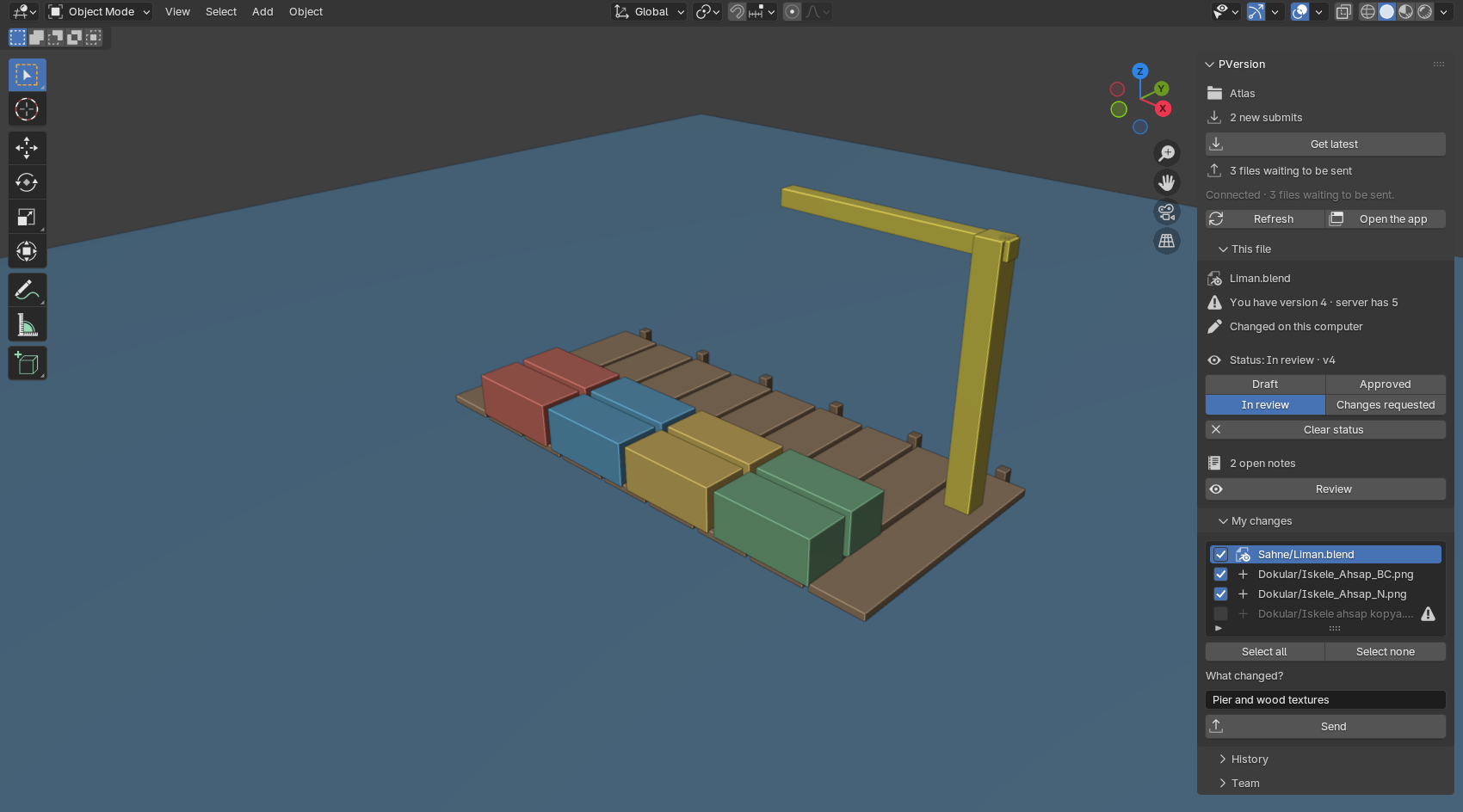
Open the sidebar in the 3D Viewport with N: the PVersion tab shows your project's state. Get latest and Send are in the File menu too.
- Get latest: see what is coming first; if a new version of your open file is coming you are asked, and the file opens again. Linked .blend files and textures reload in place.
- Send: your file is saved; tick what you want to send and write what changed.
- This file: the version you have and the server's, who else has it open, its review status (Draft, In review, Approved, Changes requested) and how many notes are open.
- Review: the file opens in the app's review window; read the notes and leave a note on the picture.
- History: see the file's versions and go back to an older one.
- Team: see who is online and the latest submits.
Questions
Does the plugin work without the app?
No. The plugin connects to no server itself; it only talks to the PVersion app on the same computer. Without the app it shows the steps on this page.
Is there a free trial?
No, PVersion is used with a paid plan. You can cancel at any time; the service runs until the end of the period you paid for.
Do Blender's backup files (.blend1) go to the server?
No. The .blend1, .blend2 backups Blender leaves when it saves are not sent; only your .blend file goes.
Can two people work on the same .blend file?
.blend files cannot be merged; while one person changes a file, the others wait until it is sent. The add-on warns you when you open a file someone else is working on. Splitting big scenes into linked files makes it easier for the team to work at the same time.
Does everyone on the team need the app?
Yes. Everyone who works on the project uses the app; each person is a user in your plan.
What language is the add-on in?
Turkish when Blender's interface language is Turkish, English in every other language.
Does it work on a Mac?
Yes; the app and the add-on work on Windows and macOS.
How do I remove the add-on?
In Blender, switch PVersion off or remove it under Edit → Preferences → Add-ons.
Support
A question or a problem? Write to [email protected] with your studio's name and your Blender version. We answer in Turkish and English.
What changed in the plugin →